
How to Join EnsayoHub as a Coach, a Gym or a Partner (Step by Step)
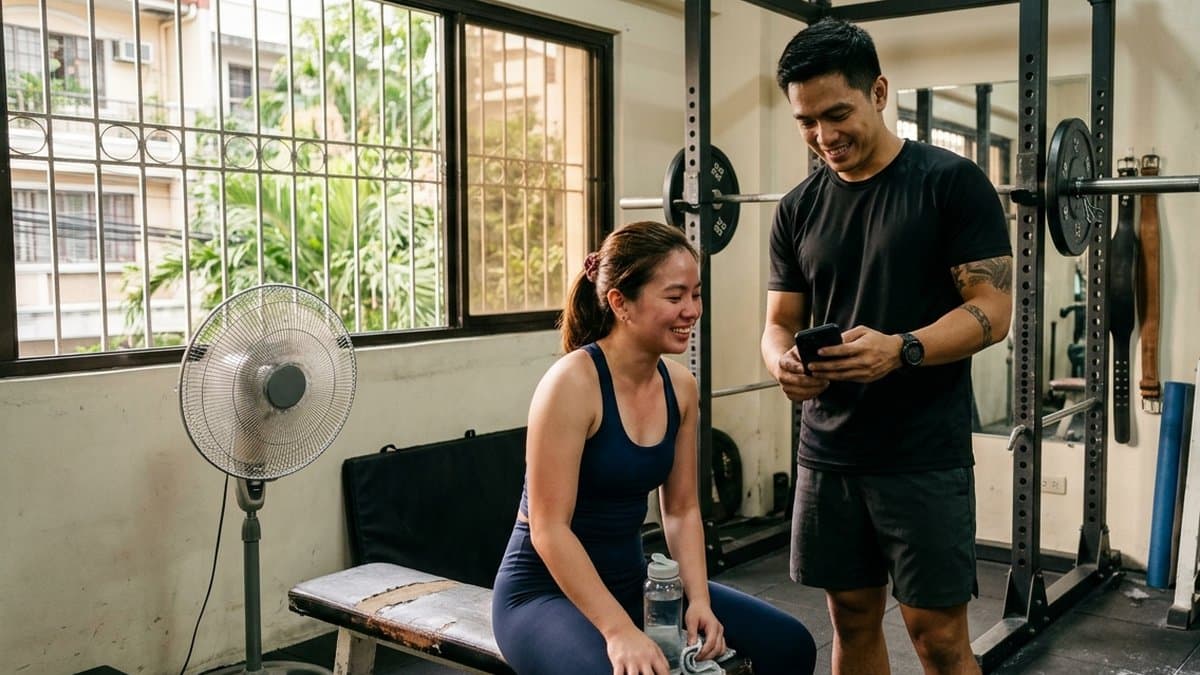
Want to coach your students on EnsayoHub, bring your gym in, or share the app with your followers? Every path starts in the same place: the app on your phone. It takes about ten minutes, it is free, and you need to be 18 or older.
Do Part 1 first, then jump to your part:
You coach (at a gym, on your own or online): Part 2
You own or run a gym: Part 3
You post about fitness or lead a club (a run club, a company team, a group of friends who train together): Part 4
Where a screen helps, you'll see the real one, taken from the app and the console.
Part 1: Everyone starts here
Step 1. Download EnsayoHub
Get it free on the App Store or Google Play from our download page.
Step 2. Create your account
Sign up with Google, with Apple on an iPhone, or with your email. If you use email, open the verification email and tap the link before you sign in. Coaching and gym registration both need a verified email.
Use the account you plan to keep. Your code, your students and your earnings all live on it, and you will sign in to it on a computer later.
Step 3. Add your birthday
Tap Account in the bottom bar, then Edit Account, and add your birthday. Coaches and gym owners must be 18 or older, and this is the only place to set it. Skip it and the coach sign-up will stop and send you back here.
That's Part 1. Now your part.
Part 2: If you coach
What you get: free coach tools, no subscription and no per-student fee. You see who trained between your sessions and how, you add your own review beside the AI's on your students' technique videos, and you message them in the app. You also earn 20% of what we receive from each Premium payment by a student who joined with your code, about ₱75 a month for each student on monthly Premium, for as long as they stay subscribed and you stay active. On top of that: 15 days of Premium when you sign up, and 2 years of Coach Premium once we check your ID.
You don't pay us anything, and we take nothing from what your students pay you for coaching.
Step 4. Tap "Are you a coach? Join free"
It's on the Account tab. Nobody has to approve you first.
Step 5. Choose your code
A word you can say out loud, like your name: 4 to 20 letters or numbers. It goes on your QR code and your poster, and it cannot be changed later, so pick one you're happy with.
Step 6. Pick what you coach
Resistance training, circuit training, boxing, Muay Thai, kickboxing, running, cycling, walking or nutrition. Add other specialties, like MMA, jiu-jitsu or yoga, and they show on your coach page.
Everything under "Optional from here on" can wait: your bio, your levels, where you coach and your contact buttons. If you coach at a gym that is already on EnsayoHub, find it under Where you coach to ask to join its team in the same step.
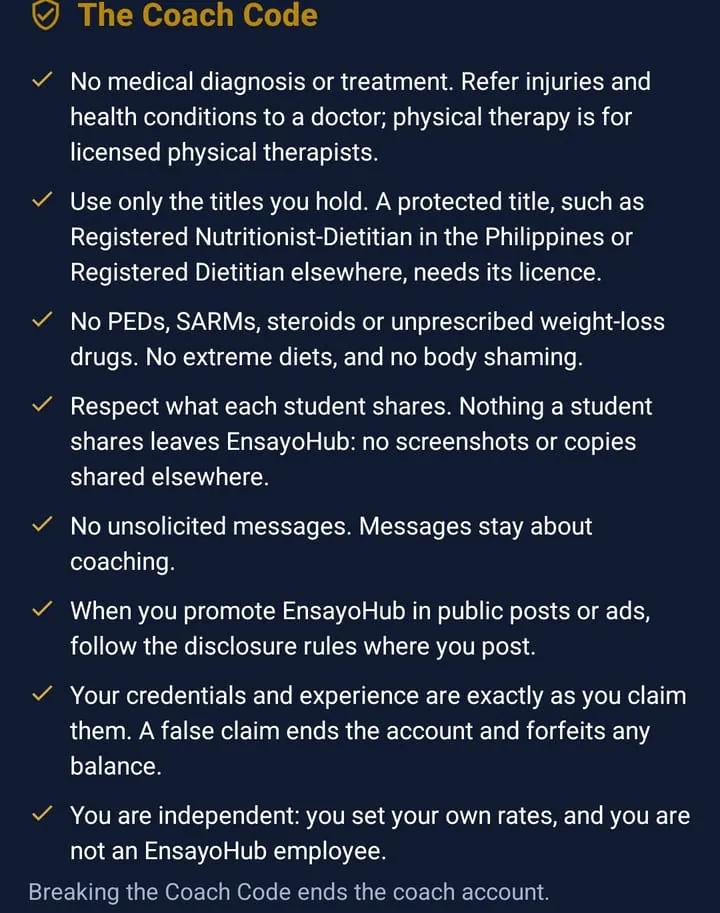
Step 7. Read the Coach Code and accept it
These are the rules every coach on EnsayoHub follows: no medical advice, only the titles you actually hold, no PEDs or extreme diets, and what a student shares stays private. Accept it and tap Become a coach.
Step 8. Share your code
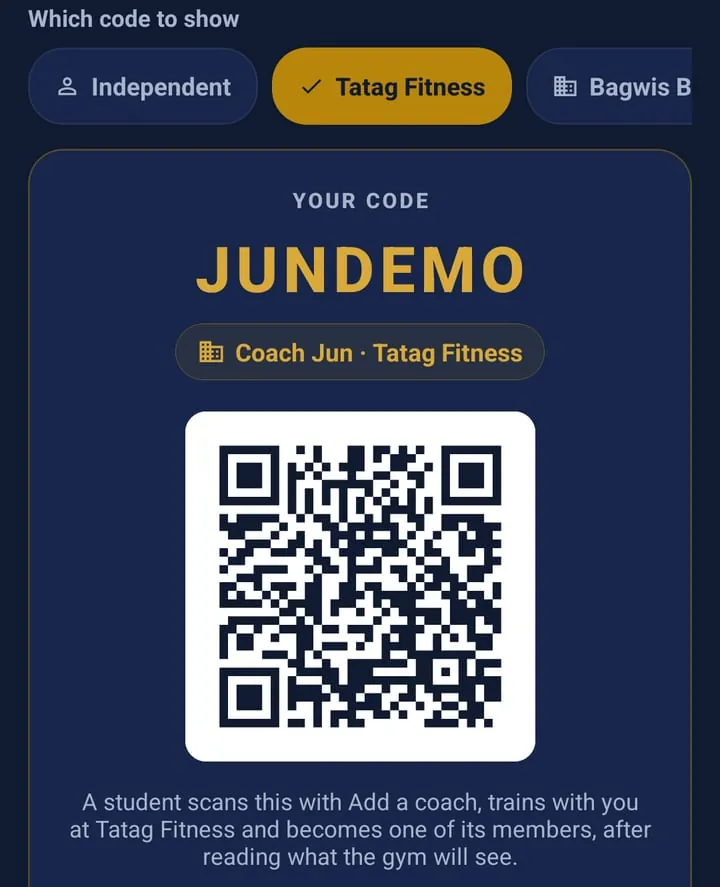
Open the Students tab and tap Your code. You get one QR for coaching on your own, plus one for each gym you coach at. Show the one for where you train that student: the line under the code says which one it is. Each code also comes with a link you can send in a chat.
Step 9. Your students add you
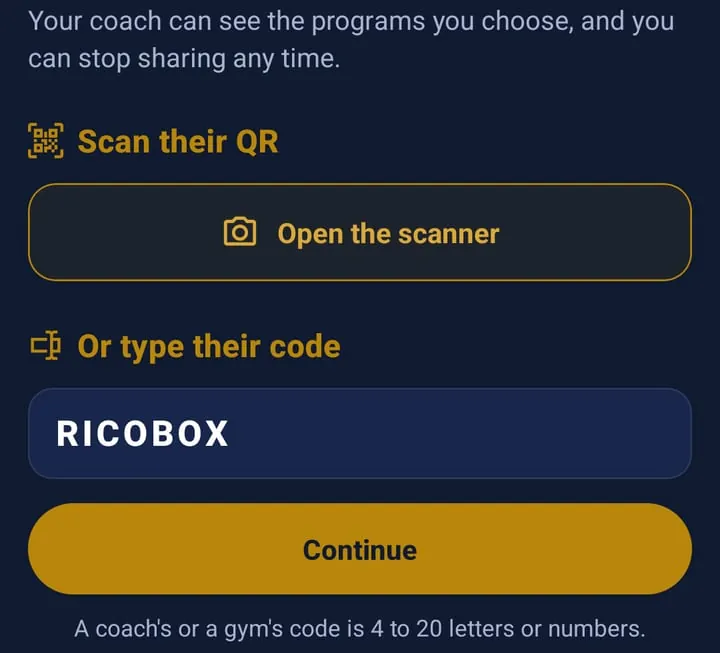
Your student downloads the app, opens Account, then Your coaching team, then Add a coach, and scans your QR or types your code. They choose which programs you coach and what you can see, and nothing is shared until they tap Allow. Students must be 18 or older too.
Their first code also gets them 15 days of Premium, no card needed. A good reason to have them type yours on day one.
Step 10. Coach from the Students tab
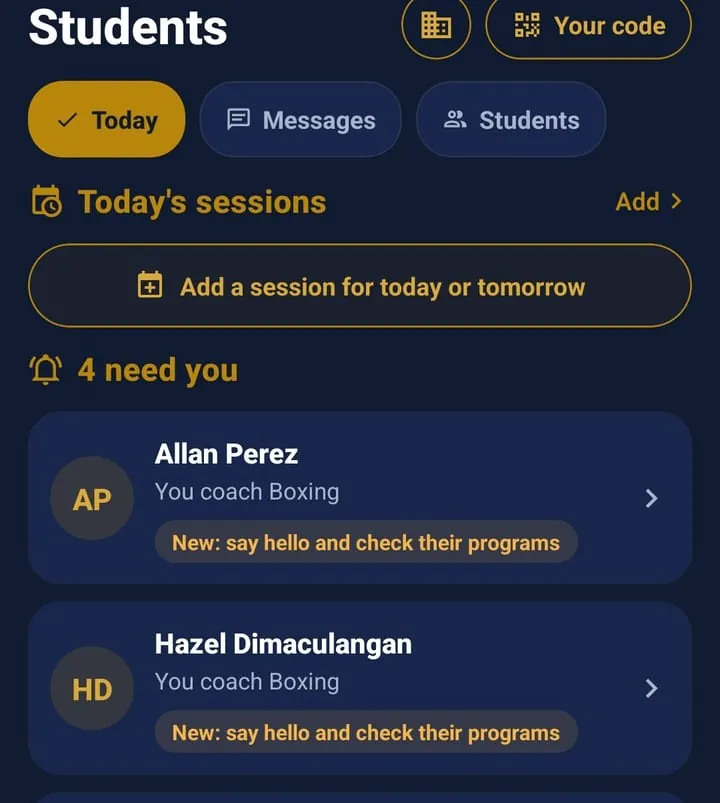
Today shows who needs you: a new student to say hello to, someone who has gone quiet or fallen behind their week, a video review waiting for your take, a message to answer. Messages holds one conversation per student, no WhatsApp needed.
Step 11. Open your console on a computer
On a computer, go to https://portal.ensayohub.com and sign in with the same account. This is the big-screen side: your program library, your schedule and attendance, each student's page, and your payouts. Every page there has a "How this works" guide, and you'll find them all in the portal's help guides.
Step 12. Check your ID
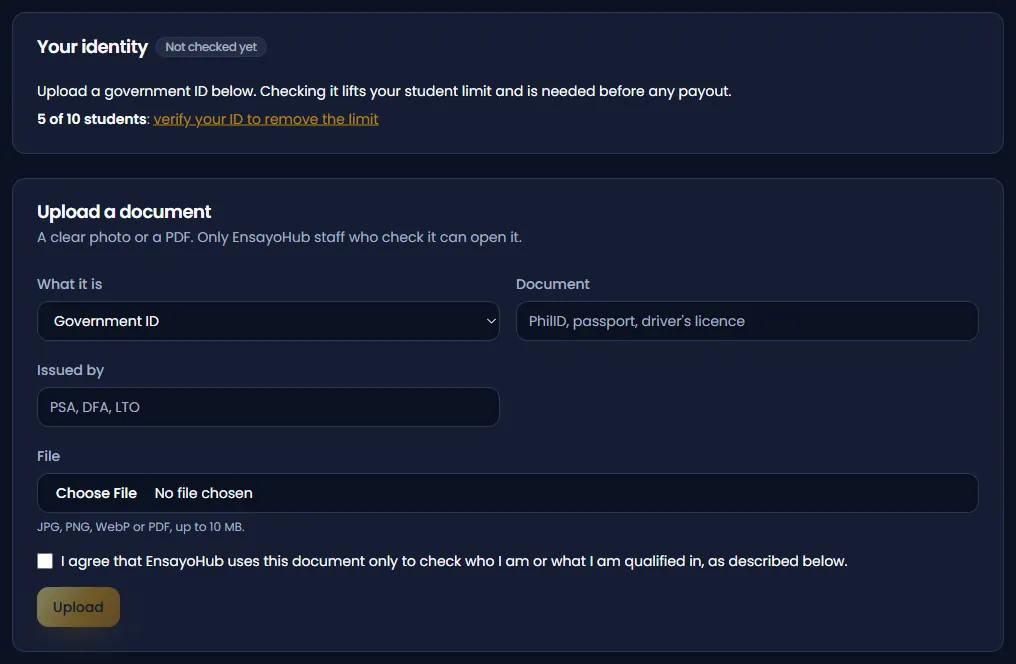
In the console, open Verification and upload a government ID (PhilID, passport or driver's licence). Until it's checked you can take up to 10 students. The check lifts the limit, turns on payouts, and starts your 2 years of Coach Premium. Commission you earn before then is kept for you, but a payment left unpaid for six months because your ID still isn't checked lapses, so don't leave it.
Step 13. Get paid
Under Payouts, add a GCash, Maya, bank or PayPal account in your own name. Once your payable balance reaches ₱500, tap Request a payout. A store payment becomes payable on the 1st of the second month after it is made, so October's commission is payable from December 1.
Part 3: If you run a gym
What you get: a console for the whole gym. Your team and which coach trains whom, every coach's sessions in one calendar, a front desk where members check in by scanning a tablet, passes, a monthly report, and the gym's own code and posters. A member who joins with the gym's code earns the gym 20% of what we receive from their Premium. A member who joins through one of your coaches is shared by the gym and that coach, half each.
Gym registration happens on a computer. Do Part 1 on your phone first: the portal can't create an email account or set your birthday.
Step 4. Register your gym
Go to https://portal.ensayohub.com, sign in with the same account, and choose Register your gym on your Account page. Enter the gym's name (city and address are optional) and choose the gym's code. Like a coach's code, it cannot be changed later.
Step 5. Accept the terms
You become the gym's owner, and every tool works at once.
Step 6. Get verified
Send your business documents from the console. Payouts start once the gym is verified.
Step 7. Set up the gym
Each of these has a short guide with pictures in the portal's help guides:
Locations: add each place you train and pin it on the entrance.
Team: invite your managers and coaches. Coaches already on EnsayoHub can also ask to join your team, and you accept or decline.
Front desk: set up your pass types, then turn a tablet, a phone or a second monitor into the screen members scan when they arrive.
Step 8. Choose your poster and put it up
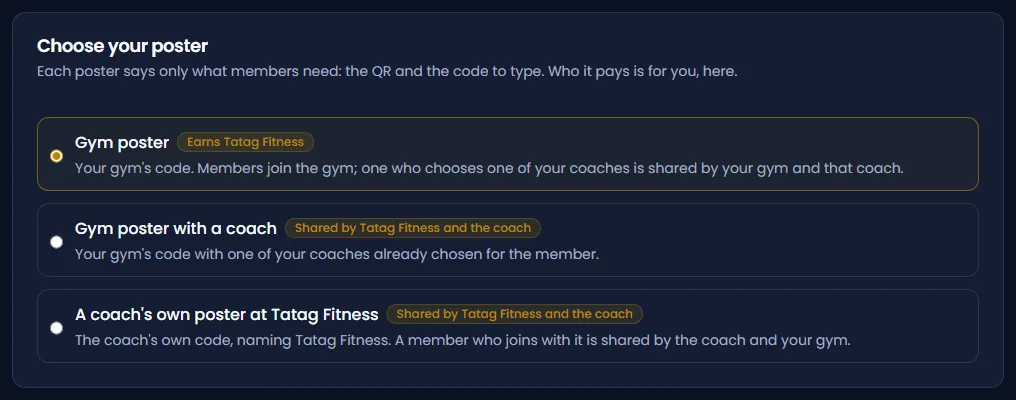
Pick a poster: the gym's code alone, the gym's code with one of your coaches, or a coach's own code at your gym. Each one says who earns, so you choose knowing exactly where the money goes.
If you coach too, do Part 2 as well. Your own code is separate from the gym's.
Part 4: If you post about fitness or lead a club
This is our partner program, for creators and for people who lead a group that trains together. It isn't self-serve yet: we talk to every partner first.
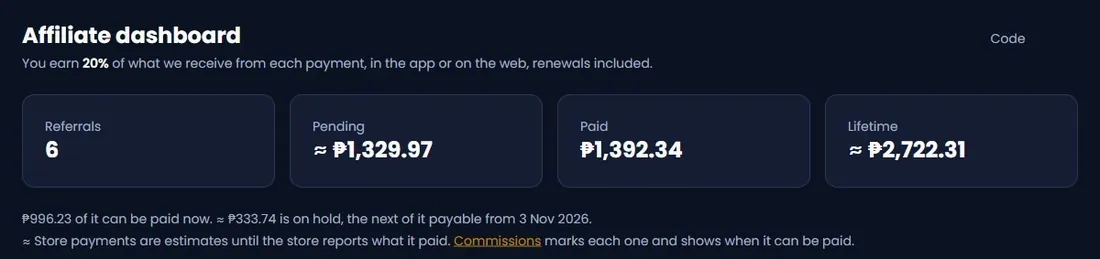
What you get: your own code and link, 20% of what we receive from each Premium payment by a member who joined with your code (about ₱75 a month for each one on monthly Premium, renewals included, while they stay subscribed and you stay active), and a dashboard that shows who joined and what you earned. Your followers get 15 days of Premium on their first code. No discount, and no card needed.
If you coach, use Part 2 instead. Same 20%, plus the coaching tools, and you can start today.
Step 4. Use it for two weeks first
Build a plan, train with it, log a few meals, ask your coach a question. Your followers trust you, so if you don't like it after two weeks, don't promote it. We mean that.
Step 5. Message us
Send us a message on our contact page: say you'd like to partner, and include your page or your club. We set up a 20-minute call, check your ID (you must be 18 or older), and look at your audience together.
Step 6. Get your code and link
Once you're approved, you choose your code: a word your followers can type, 4 to 20 letters or numbers. You also get your own link to share in your bio, captions, Stories and group chats.
Step 7. How your followers use your code
Your link opens a page that says you shared EnsayoHub with them, with the store buttons and your code ready to copy. Then they download the app and enter your code:
Signing up with email: in the Partner code box on the sign-up form.
Signing up with Google or Apple: on the Account tab, under Partner code.
The app then offers them 15 days of Premium, no card needed. The days start when they tap Claim my 15 days. It works once, on a follower's first partner code, and not for anyone already paying. The first code a member enters is the one that counts, so ask them to enter yours on day one.
Step 8. Track what you earn
Sign in at https://portal.ensayohub.com with the same account you use in the app. Your dashboard shows your code, how many people joined with it, and what's pending and paid. Referrals lists each sign-up by first name and last initial (never their contact details, workouts or meals), and Commissions shows every payment and when it can be paid. Once your payable balance reaches ₱500, it's paid to the GCash, Maya or bank account in your name.
Step 9. Post, and say it's a partnership
Three posts in your first 90 days, in your own format and words, one of them showing your own use. Every post says you partner with us: it's the rule for ads here, and followers respect it more than a hidden deal.
Still stuck?
Every console screen has a guide in the portal's help guides, and the app has its own under Account, Tutorials (look for "Coaching Your Students"). Or email support@ensayohub.com and a person will answer.