
Why you skip the workout you planned, and how I redesigned EnsayoHub around the fix

You finally have an hour to train. You open your fitness app, and it hands you a weekly chart, a streak, three badges, a calorie ring and a list of programs. Ten minutes later you're still scrolling, and you haven't picked up a dumbbell.
Short answer: the app should tell you what to do now, in one tap, and keep everything else one tap away. I rebuilt EnsayoHub around that one question. When you open it, Home shows your day at a glance: this week's workouts, today's calories left, and the workout that's up next. One tap takes you to that workout and its Start button. Everything else has its own place, and waits its turn.
Below: why that matters more than it sounds, especially in your first few months, and then a quick tour of the new screens.
Why one clear next step beats a screen full of numbers
This part works with any plan, on paper or on a phone.
Every decision before your first set is a chance to skip. Which program? What day of the plan is it? Legs or upper body? Is 40 minutes enough? Each question is small, and each one is a gap an excuse can slip through. In twenty years of training, the people I've seen stick with it usually weren't the most motivated ones. They just have fewer decisions left when the moment comes.
Psychologists call the fix an if-then plan: "If it's 6:30 PM on Monday, then I do Monday's workout at the condo gym." A review of 94 studies (Gollwitzer and Sheeran, 2006) found that people who planned this way followed through noticeably more often than people who only set a goal. The plan makes the decision, so you don't have to make it at 6:30 PM when you're tired.
Numbers are worth reading, just not right before you train. Your scale weight can move a kilo or more from one day to the next with water, salt and the rice you had last night. A scale that jumps a kilo on the day you planned to train can talk you out of the one thing that would move it. Read your numbers once a week, as a trend. Before a session, you only need to know what comes first.
Make the start small. On a bad day, promise yourself the first exercise only. Once you've started, you'll usually finish. On the days you don't, one exercise still beats zero, and you kept the habit of showing up.
Missing a day doesn't reset you. In a well-known study of how habits form (Lally and colleagues at University College London, 2010), it took people a median of 66 days for a new daily habit to feel automatic, from 18 days to an estimated 254. Missing a single day didn't meaningfully set them back. So if Tuesday falls apart because of overtime or the traffic on EDSA, Wednesday isn't day one again. It's just Wednesday.
Put together: decide in advance, show one next action, read the trends weekly, and don't treat a missed day as a failure. Here's how that turned into the new screens.
Home: today comes first
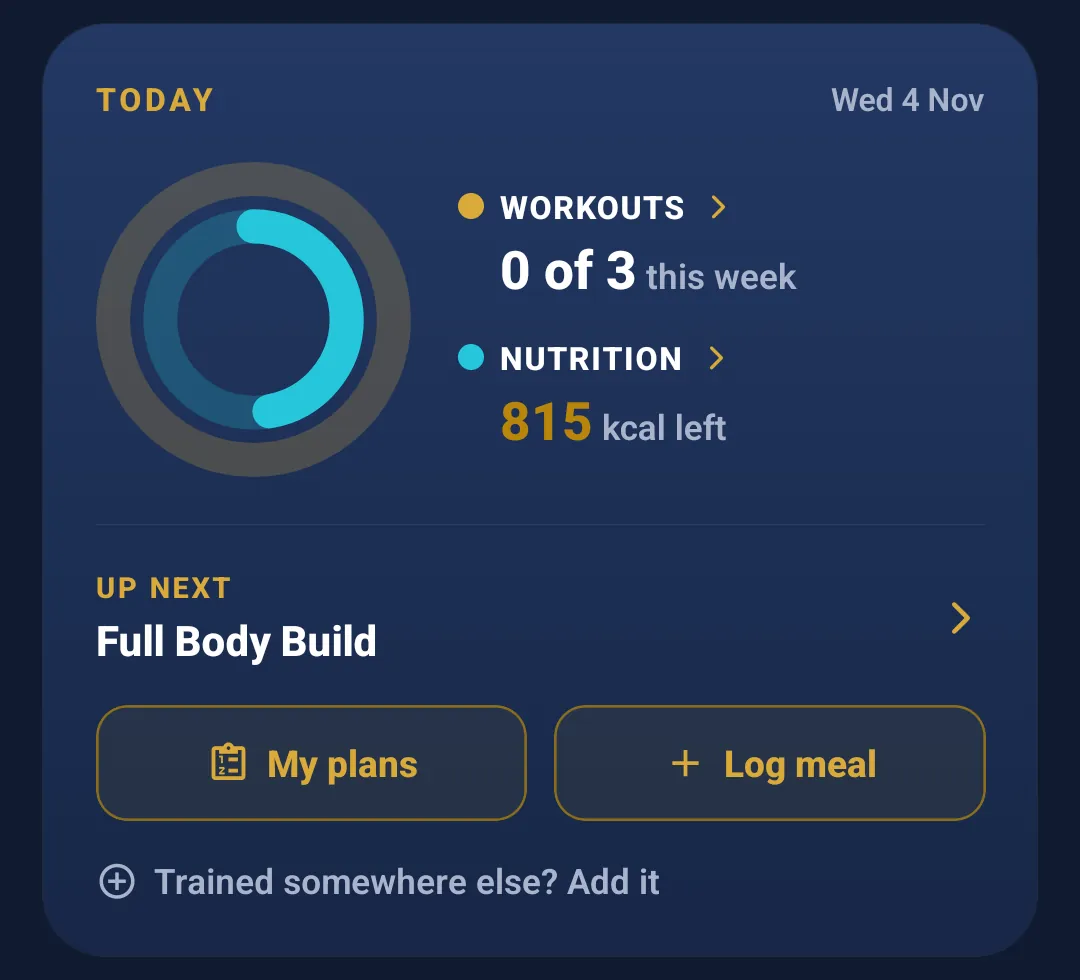
At the top of Home is the Today card. Two rings show how your day is going: one for this week's workouts, one for the calories you have left today. Under them sits the workout that's up next, then two buttons, My plans and Log meal. If you trained somewhere else, a basketball game or a class at another gym, Add it sits right under those.
If you're new, a Getting started box under it points you to the one short walkthrough for where you are (for a lifting plan, "How a workout works", then "Log your meals"). Close it whenever you like; every walkthrough stays in Account.
Under the card, a Weight row shows your last weigh-in.
Along the bottom, Home, Coach, Progress and Account each have a tab. Progress is now one page, with filters for training, nutrition and body, instead of numbers spread across three screens.
Tap the workout that's up next and you land on Workouts, where the Up Next card waits at the top: the one workout your plan suggests, and one gold Start button. Whatever you train (lifting, martial arts, circuits, or a walk, run or ride), that card answers "what now?" If you started a workout and got pulled away, Home shows a gold Continue instead, so you're back in with one tap.
In a workout: one thing at a time
The workout screens follow the same rule.
My Workout Plans shows each day of your plan as a card with one Start.
Current Session shows a ring with how many exercises are done, then an Up Next card: the exercise, its sets, reps and weight, and your best so far. The rest of the workout is a numbered list below it.
Track Workout is a plain table for your sets, with the rest timer beside them and the Log button where your thumb already is.
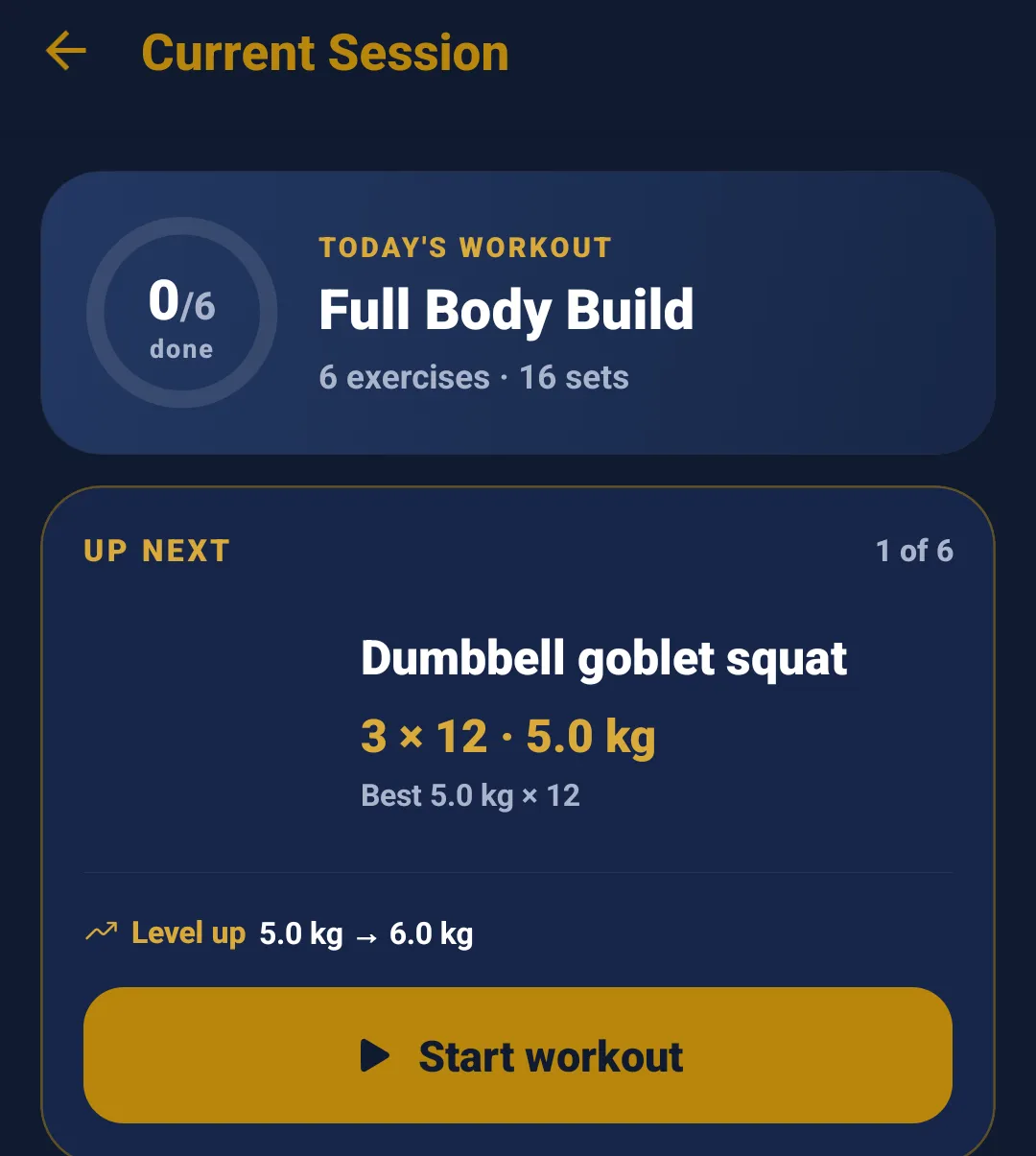
On exercises where you're ready to push, a Level up line suggests the next step, more weight or one more rep, based on what you logged last time. You can take it or skip it. I explained the rule behind it in When should you add weight?
Machine taken? Swap it for today
By 6:30 PM the gym is full of the after-office crowd. You get to the leg press and three people are waiting for it.
In a resistance workout, tap Swap, in the Track Workout header or beside Start on the Up Next card once your workout has started. The list puts the same kind of movement on top, easiest first, so a squat stays a squat. One tap swaps it. The new exercise keeps the same sets and reps, with weights filled in from the last time you did that exercise.
A note pops up: Swapped for today, with Undo and Keep in my plan. Your plan stays exactly as it was unless you tap Keep.
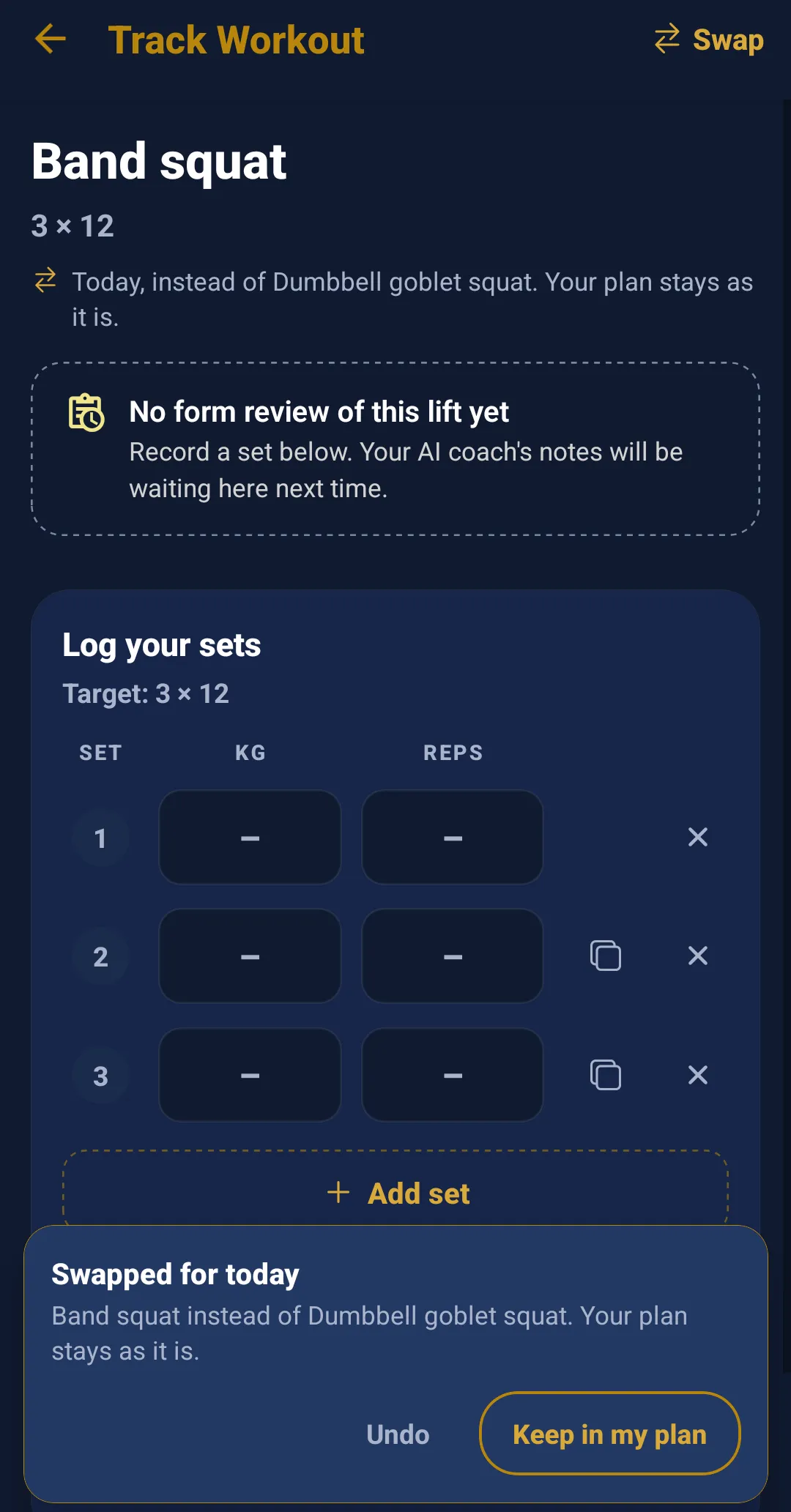
You can also add or remove a set in the middle of a workout. If your rows are moving well, tap + Add set under the last one, and the table shows "4 today · plan 3". That change is for today only, too.
Both are for resistance workouts only. Martial arts rounds, circuits and runs don't have them.
Building a program
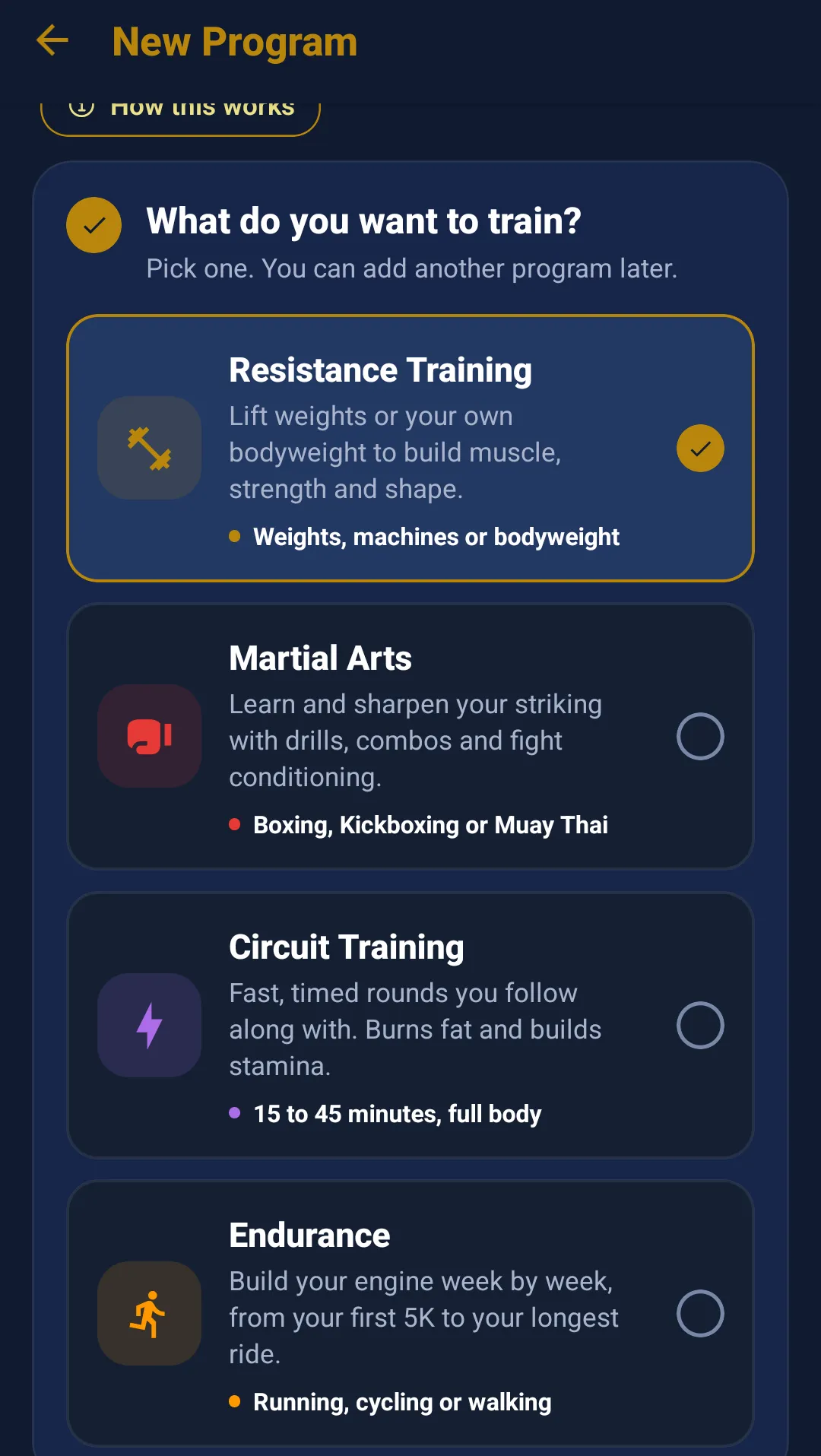
Build your program asks a few questions. First: what do you want to train? Resistance Training, Martial Arts, Circuit Training or Endurance, each on a card that says in one line what it is. Then your goal and level, with a short hint under each, and the days you can train, picked with a tap. Some goals and options are Premium, and those show a lock.
Nutrition: calories left, at a glance
The Nutrition screen leads with one number: calories left today. That's your daily goal, minus what you ate, plus what you burned in the workouts you logged. Eaten and burned sit on either side of it, so you can always see the working.
Below it: Snap a meal to scan your plate with a photo, Describe to type what you ate, and Log again for meals you've had before, which uses no AI scan. Your day stays split into Breakfast, Lunch, Dinner and Snacks, and an empty Dinner row reading "Nothing yet" is your reminder.
If "calories left" is new to you, I explained why it counts net and not gross in Should you eat back the calories you burned?
Reviews: a grade, a word, one thing to work on
Technique and form reviews now open with a letter grade and a word next to it, written by your coach: Fury starts from what you did well, Katana from the fault that matters most, and both end on one thing to work on. The rest of the detail stays folded until you want it. These reviews are Premium.
If you're new here
If you already train with EnsayoHub, most of this is already on your phone: open the app, tap the workout that's up next, and press Start. If you don't, I built an app called EnsayoHub: an AI coach for your whole week, not just one kind of workout. It builds a plan around your goal, your equipment and the days you have, tracks your workouts and meals in one place, and lets you ask your coach about your training and your food. It covers lifting, martial arts, circuits, and walking, running or cycling. Free to start.
Download: https://ensayohub.com/#download